

CGI & 3D

What Is 3D Modeling?

What Is 3D Modeling?
ZGIAN / CGI & 3D
What Is 3D Modeling? visual guide
Zgian visual guide: What Is 3D Modeling?
What Is 3D Modeling? visual guide
Zgian visual guide: What Is 3D Modeling?

By Zgian Editorial

How artists build digital objects, characters, environments and production-ready assets.

What this guide covers

  • Where this topic fits in a professional CGI/VFX pipeline.
  • Core concepts and terminology you should understand.
  • Practical production considerations: quality, consistency, performance and handoff.
  • How the topic connects to modeling, animation, rendering and compositing.

Production perspective

What Is 3D Modeling? is best understood as part of a connected 3D pipeline. Good results depend not only on the individual technique, but also on clean assets, predictable handoffs, version control, review and final rendering.

As AI-assisted tools become more capable, artists still need strong fundamentals to evaluate topology, motion, materials, lighting, continuity and final-pixel quality.

← Back to CGI & 3D · VFX Hub · AI Video

Advertisement
ZGIAN PRODUCTION CONTEXT

Where What Is 3D Modeling? fits in the production workflow

What Is 3D Modeling? is best understood as part of a wider creative and technical pipeline. Depending on the project, it may connect with 3D modeling, texturing, lighting, animation, and rendering. Understanding those relationships helps artists choose an efficient workflow instead of treating a technique or software feature in isolation.

What to evaluate on a real project

  • What is the intended final output and what quality level is required?
  • Which parts of the shot are best handled manually, procedurally, or with tracking/automation?
  • How will the work be reviewed, revised, versioned and handed off to the next department?
  • What happens when lighting, motion blur, transparency, perspective or other difficult shot conditions change?

Related Zgian guides

Ray Tracing & Path Tracing 3D Crowd Simulation 3D Creature Animation 3D Lighting for Film & VFX What Is PBR?

Editorial note: software interfaces and AI capabilities change over time. Check current vendor documentation before relying on version-specific features.


VFX

What Is 3D Modeling? A Beginner’s Guide to Creating Digital Objec

Home / VFX / 3D Modeling
CGI & 3D Fundamentals
What Is 3D Modeling? A Beginner's Guide to Creating Digital Objects visual guide
Zgian visual guide: What Is 3D Modeling? A Beginner’s Guide to Creating Digital Objects
What Is 3D Modeling? A Beginner's Guide to Creating Digital Objects visual guide
Zgian visual guide: What Is 3D Modeling? A Beginner’s Guide to Creating Digital Objects

By Zgian Editorial

3D modeling is the process of building the digital shape of an object, character or environment. It is one of the first major steps in turning an idea into usable CGI.

By Wickrama Deegalla · August 23, 2026 · 11 min read
ZGIAN / 3D MODELING HERO IMAGE
Quick answer: 3D modeling is the process of creating digital geometry in three-dimensional space. Artists build models from points, edges and polygons, or use sculpting and procedural techniques, then prepare those models for UVs, textures, rigging, animation, rendering or simulation.
In this guide

  1. What is 3D modeling?
  2. What are vertices, edges and polygons?
  3. What are the main 3D modeling methods?
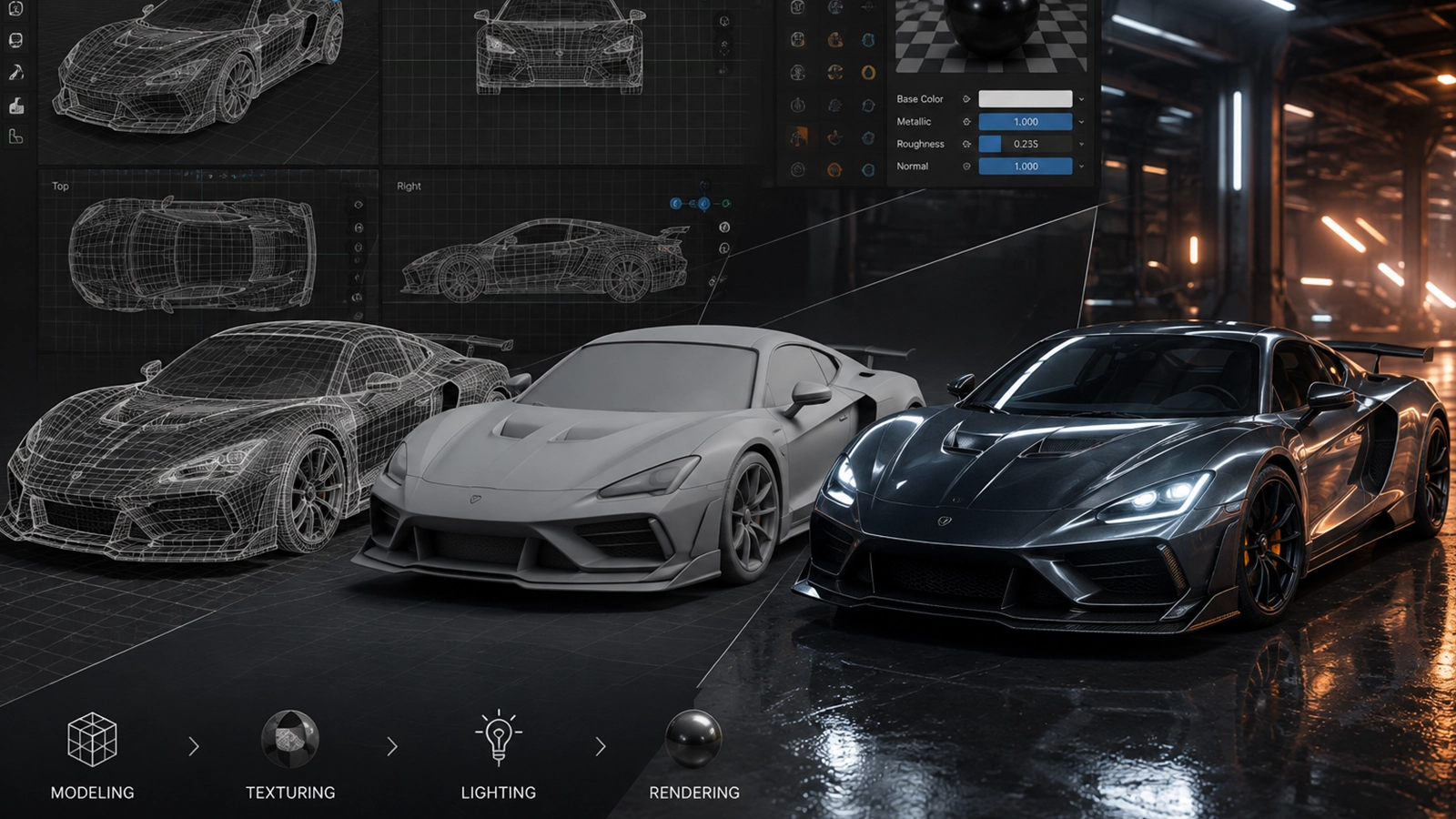
  4. How does a 3D modeling workflow work?
  5. What is topology and why does it matter?
  6. How is character modeling different?
  7. Why do models need optimization?
  8. What happens after modeling?
  9. FAQ

What is 3D modeling?

3D modeling is the creation of a digital object using geometry. The model can represent almost anything: a human character, creature, vehicle, building, product, prop or entire environment.

In CGI and VFX, the model is usually only one part of the final asset. Once the shape is approved, it may need UV mapping, texturing, shading, rigging, animation and lighting.

Zgian Pro Insight

A production model is not simply the most detailed model possible. It is the model that has the right detail for the camera, shot and pipeline. More polygons do not automatically mean better results.

What are vertices, edges and polygons?

Most polygon-based 3D models are built from three basic components:

VerticesPoints in 3D space
EdgesLines connecting points
FacesSurfaces enclosed by edges
PolygonsCollections of faces forming the model

Artists manipulate these components to shape the object. The arrangement of the geometry affects how the model looks, deforms and performs during rendering.

What are the main 3D modeling methods?

Polygon modeling

Polygon modeling builds the shape by directly editing geometry. It is widely used for props, environments and characters because artists have precise control over the form and topology.

Sculpting

Digital sculpting works more like shaping clay. Artists can push, pull and smooth a high-resolution surface to create organic forms such as faces, muscles, creatures and damaged materials.

Procedural modeling

Procedural techniques use rules, parameters or node systems to generate geometry. They are particularly useful for large environments, repeated structures and variations.

3D scanning and photogrammetry

Real objects can be captured using photographs or scanning systems and converted into digital geometry. Artists may then clean, retopologize and optimize the result for production.

How does a 3D modeling workflow work?

A simplified workflow might look like this:

1 · ReferenceStudy drawings, photos and dimensions
2 · BlockoutEstablish major shapes
3 · DetailBuild secondary and fine forms
4 · TopologyOrganize usable geometry
5 · UVPrepare the surface for textures
6 · SurfaceTexture and shade the asset
7 · TestCheck deformation and rendering
8 · DeliverPublish the production asset

Start with reference

Reference gives the artist information about proportions, materials, construction and small details. For realistic work, multiple angles and measurements can be extremely valuable.

Block the primary forms

The first pass should establish the big shapes. If the silhouette is wrong, adding tiny details will not solve the underlying problem.

Add secondary and tertiary detail

Once the major form works, artists can add features such as seams, wrinkles, panel lines, pores or mechanical components where the shot requires them.

Advertisement

What is topology and why does it matter?

Topology describes how the geometry is organized and connected. Good topology can make a model easier to deform, edit, unwrap and render.

For an animated character, edge flow around areas such as the mouth, eyes, shoulders and joints can have a major effect on deformation. A static prop may have different topology priorities because it does not need to bend.

How is character modeling different?

Character modeling has additional requirements because the asset must communicate anatomy, expression and personality while also supporting animation.

Artists often work with a high-resolution sculpt for detail and a production-friendly mesh for deformation and rendering. The final asset may contain multiple levels of detail for different distances from the camera.

Why do models need optimization?

A model can become extremely heavy if every surface contains unnecessary geometry. Production artists optimize assets so they deliver the required visual quality without consuming excessive memory or rendering time.

  • Remove geometry that cannot be seen.
  • Use efficient topology where possible.
  • Represent small details with textures or normal information when appropriate.
  • Create suitable levels of detail for different camera distances.
  • Keep assets organized so other departments can work efficiently.
Zgian Pro Insight

Think of modeling as building for a camera. A background object may need far less detail than a hero character filling the frame. Production modeling is always a balance between visual requirements and technical cost.

What happens after modeling?

Once the model is approved, it normally moves into other parts of the CGI pipeline.

How Is CGI Made?
See the complete CGI pipeline.

What Is 3D Texturing?
Give the model a believable surface.

What Is Rigging?
Prepare characters for animation.

Frequently asked questions

What is 3D modeling used for?

It is used to create digital characters, objects, products, buildings, vehicles, environments and many other assets for movies, games, advertising and visualization.

Is 3D modeling difficult to learn?

The basic tools can be learned relatively quickly, but professional modeling requires practice in form, proportion, topology, observation and production workflows.

What is the difference between modeling and sculpting?

Modeling often involves directly constructing and editing geometry, while digital sculpting focuses on shaping a high-resolution surface more like digital clay. Production commonly uses both.

Does a 3D model need textures?

Not always. A model can be used with simple materials or procedural shaders, but many realistic assets need textures and detailed surface information.

Continue the Zgian CGI & 3D series

Wickrama Deegalla
3D Generalist & VFX Professional · About the author →
Advertisement