
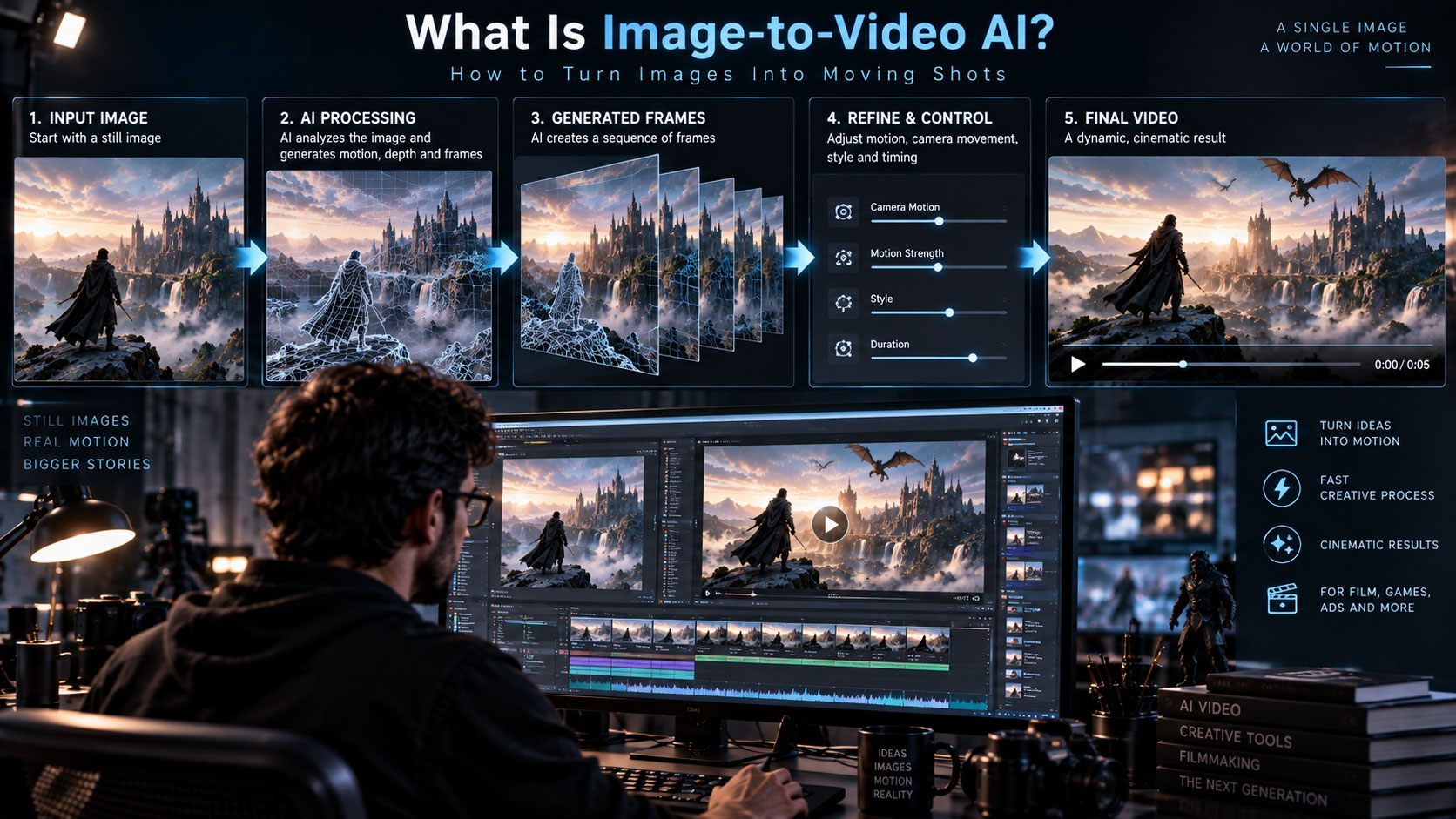

Image-to-video AI starts with a still image and generates motion around it. For creators, this makes a powerful bridge between AI image generation, cinematography and video production.
- What is image-to-video AI?
- How does image-to-video work?
- Why is the reference image important?
- What kinds of motion can you request?
- How do you prompt image-to-video?
- How do you preserve character consistency?
- What is a practical workflow?
- What problems should you expect?
- How can filmmakers use it?
- FAQ
What is image-to-video AI?
Image-to-video AI is a generative video technique in which a still image provides the visual starting point for a generated clip. The system attempts to infer how the scene could move while maintaining important characteristics of the reference.
This makes it especially useful when you already have a concept image, character design, product image, environment, storyboard frame or AI-generated still that you want to turn into a shot.
Image-to-video is often more useful for controlled filmmaking than starting from text alone because the reference image establishes composition and visual identity before motion is generated.
How does image-to-video work?
A simplified workflow looks like this:
The exact controls vary between AI video systems. Some allow additional references, motion settings, camera instructions, start/end frames or other forms of guidance.
Why is the reference image important?
The image acts as an anchor for the visual appearance of the shot. A clear image with a strong subject, readable silhouette and intentional composition gives the generation process useful information.
Before animating an image, check:
- The subject is clearly separated from the background.
- The face or important object is not already distorted.
- The composition leaves room for the requested movement.
- Lighting and perspective are consistent with the intended shot.
- Fine details are not unnecessarily cluttered.
What kinds of motion can you request?
It is usually better to define a small number of important movements rather than asking for many unrelated actions at once.
How do you prompt image-to-video?
A useful prompt describes what should change while allowing the reference image to define much of what should remain stable.
A practical structure is:
[Subject movement] + [Camera movement] + [Environmental motion] + [Timing or mood]
For example: “The character slowly turns toward camera while the camera makes a subtle push-in; hair and clothing move gently in the wind; natural cinematic motion.”
This is often more effective than repeating every visual detail already visible in the image.
How do you preserve character consistency?
Consistency starts before generation. Use a strong reference image and avoid unnecessary changes between shots.
- Keep the character design stable.
- Use consistent clothing and accessories.
- Keep lighting direction compatible between shots.
- Use similar camera language for connected shots.
- Generate shorter clips when continuity is difficult.
- Use editing and compositing to hide or correct small inconsistencies.
If a character keeps changing, don’t immediately add more prompt words. First ask whether the reference image, camera movement and requested action are too difficult for the model to preserve simultaneously.
What is a practical image-to-video workflow?
- Create or select the still: Establish the character, environment and composition.
- Define the shot: Decide exactly what needs to move.
- Write a focused motion prompt: Describe subject and camera movement.
- Generate variations: Produce several short candidates.
- Choose the cleanest result: Prioritize continuity and usable motion.
- Refine: Adjust motion or references rather than changing everything.
- Edit: Combine successful clips into a sequence.
- Finish: Add compositing, sound, color and cleanup.
What problems should you expect?
- Faces or identities may subtly change.
- Hands and small objects can deform.
- Camera motion may become unstable.
- Background geometry may shift.
- Fast movement can create artifacts.
- Reflections and transparent objects can be difficult.
- Long clips may lose visual consistency.
These are reasons to treat generated clips as production material that still needs review rather than assuming every output is final.
How can filmmakers use image-to-video AI?
Image-to-video can fit into several stages of filmmaking and visual development.
Turn still concepts into moving pitch material.
Previsualization
Explore camera and action before full production.
Social Content
Create motion from posters, artwork and stills.
For VFX artists, the technique can also provide reference material, concept exploration or temporary shots that later become guides for traditional production.
Image-to-video vs text-to-video
Neither approach is universally better. The right choice depends on how much visual control you already have before generation.
Read more: How Does Text-to-Video AI Work?
Frequently asked questions
What is image-to-video AI?
It is a generative AI method that uses a still image as a visual reference and creates a moving video sequence from it.
Can image-to-video animate a photo?
Yes. It can generate motion from many kinds of still images, although the quality and degree of control depend on the system and the image.
How do I keep a character consistent?
Use strong reference images, simple controlled motion, consistent visual design and shorter shots, then use editing or compositing for additional cleanup.
Is image-to-video better than text-to-video?
It can provide more visual control because the starting image establishes appearance and composition, but the best method depends on the project.
3D Generalist & VFX Professional · About the author →


