
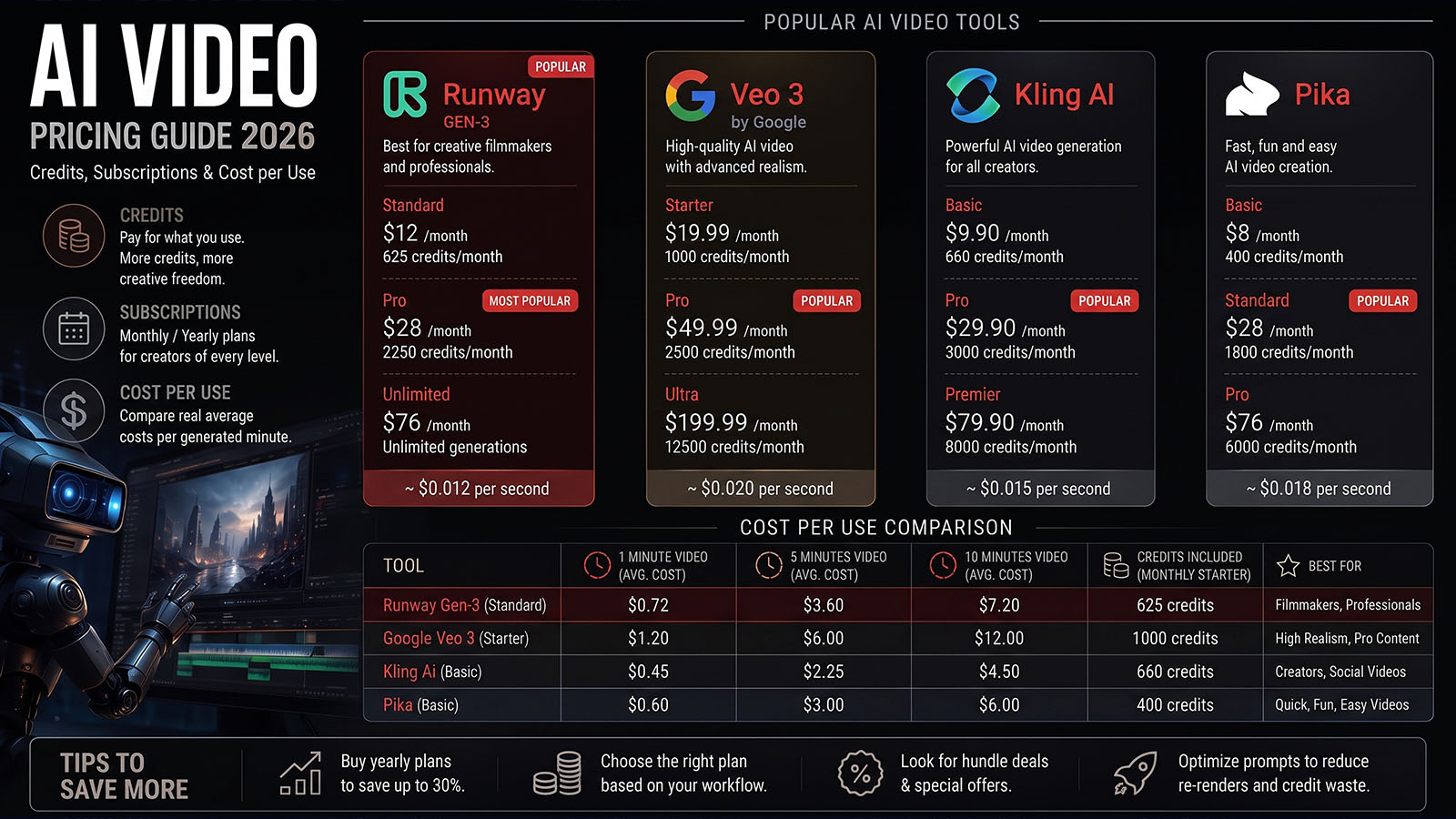


The cheapest AI video subscription is not always the cheapest way to produce a finished shot. The useful number is how much you spend to get footage you can actually use.
- Why AI video pricing is confusing
- Current Runway pricing example
- How to calculate cost per generated second
- How to calculate cost per usable shot
- Why credits are different from seconds
- How to build an AI video budget
- Common pricing mistakes
- How to choose a plan
- Why pricing content has commercial value
- FAQ
Why is AI video pricing so confusing?
AI video platforms often charge through subscriptions, credits, model-specific rates or a mixture of these. Two plans with similar monthly prices can produce very different amounts of usable footage.
Even within one platform, a five-second generation from one model can consume dramatically more credits than a five-second generation from another. Resolution, audio, image references and other features can also affect cost.
For production planning, ignore the marketing phrase “X minutes of video” until you know which model, resolution and generation settings that number assumes.
Current Runway pricing example
Runway’s current pricing page lists Free, Standard, Pro and Max plans. The current annual-billing display lists Standard at $12/month, Pro at $28/month and Max at $76/month, with 625, 2,250 and 9,500 monthly credits respectively; the Free plan includes a one-time 125-credit allocation.
| Plan | Current displayed price* | Monthly credits | Example Gen-4.5 output |
|---|---|---|---|
| Free | $0 | 125 one-time | Test allocation; model availability varies |
| Standard | $12/mo annual billing | 625 | About 52 seconds |
| Pro | $28/mo annual billing | 2,250 | About 187 seconds |
| Max | $76/mo annual billing | 9,500 | About 791 seconds |
*Prices and included models can change. The figures above reflect the current Runway pricing information checked for this article on August 23, 2026.
Runway’s help documentation says Gen-4.5 uses 12 credits per second. Standard and Pro monthly credits do not roll over, while Max can roll over up to one month of unused credits.
How do you calculate cost per generated second?
The simplest formula is:
For example, using Runway’s current annual-billing Standard display and its stated Gen-4.5 allowance, the theoretical cost is roughly $12 ÷ 52 seconds ≈ $0.23 per generated second. This is not the real cost of a finished shot because it assumes all generated footage is useful.
How do you calculate cost per usable shot?
This is the number Zgian recommends using for real production.
Example: imagine you spend $30 generating 30 attempts and only 6 are good enough to use. Your effective cost is:
If each usable shot is 5 seconds, the effective cost is $1 per usable second.
Why are credits different from seconds?
A credit is a platform-specific accounting unit. It is not a universal measurement of video.
Runway’s current API pricing, for example, lists Gen-4.5 at 12 credits per second, Gen-4 Turbo at 5 credits per second, and Veo 3.1 with audio at 40 credits per second. Its API credits are priced at $0.01 each.
| Example Runway API model | Credits/second | Approx. API cost/second |
|---|---|---|
| Gen-4.5 | 12 | $0.12 |
| Gen-4 Turbo | 5 | $0.05 |
| Veo 3.1 with audio | 40 | $0.40 |
| Veo 3.1 without audio | 20 | $0.20 |
These are API examples, not direct equivalents of consumer subscription pricing. They demonstrate why you should always compare the actual model and billing method you intend to use.
How do you build an AI video budget?
Then estimate:
Add extra allowance for retries, references, upscaling, audio, editing and unexpected failures.
Example production budget
| Project | Final footage | Average attempts | Estimated generated footage |
|---|---|---|---|
| Short social clip | 20 sec | 4× | 80 sec |
| Product concept | 30 sec | 5× | 150 sec |
| Short cinematic sequence | 60 sec | 8× | 480 sec |
The exact dollar cost depends on the model and platform. The important insight is that generation volume can be many times larger than final runtime.
What are the most common AI video pricing mistakes?
- Comparing monthly prices without comparing credits.
- Ignoring failed generations.
- Comparing different resolutions as if they cost the same.
- Assuming every model uses the same credit rate.
- Forgetting audio or reference-image costs.
- Ignoring credit expiration.
- Buying a high-volume plan before testing the workflow.
- Calculating cost from generated seconds rather than usable seconds.
Before buying a large plan, run a controlled test: generate the same type of shot 10–20 times, record the credits used and count the outputs you would genuinely put into an edit. That gives you a much better production-cost estimate.
How should you choose an AI video plan?
- Start small: Test the free or lowest practical tier.
- Measure your workflow: Track attempts per usable shot.
- Calculate effective cost: Use cost per usable second.
- Check expiration: Know whether unused credits roll over.
- Check commercial terms: Especially for client work.
- Upgrade only when justified: Higher volume should solve a real bottleneck.
Runway’s current documentation explicitly says Standard and Pro credits do not roll over, while Max allows up to one month of rollover.
Why is AI video pricing valuable for Zgian?
Pricing searches usually happen close to a buying decision. That makes them commercially valuable without requiring Zgian to become a purely promotional site.
The strongest approach is to publish transparent calculations, explain limitations and update the figures when providers change their plans. Affiliate links can then be placed where they genuinely help readers move from research to testing a tool.
This also creates a natural connection between Zgian’s informational articles and its commercial articles: a reader can learn what AI video is, compare the best tools, then use this pricing guide to decide which plan makes sense.
Use this simple pricing formula
÷
Usable Final Seconds
For a more accurate studio estimate, include the value of artist time spent generating, selecting, editing and cleaning the footage.
Frequently asked questions
How much does AI video generation cost?
It varies widely by provider, model, resolution and billing method. Current Runway examples range from a few cents per generated second for some models to much higher rates for premium models and API configurations.
Is a monthly AI video subscription cheaper than paying per generation?
It depends on usage. A subscription can be economical for regular generation, while API or pay-as-you-go pricing may make more sense for occasional or automated workloads.
What is the best way to compare AI video prices?
Compare the model’s cost per generated second, average number of attempts per usable shot, output quality and the number of usable final seconds you actually obtain.
Do AI video credits expire?
It depends on the provider and plan. For example, Runway says Standard and Pro monthly credits do not roll over, while Max can roll over up to one month.
3D Generalist & VFX Professional · About the author →


