
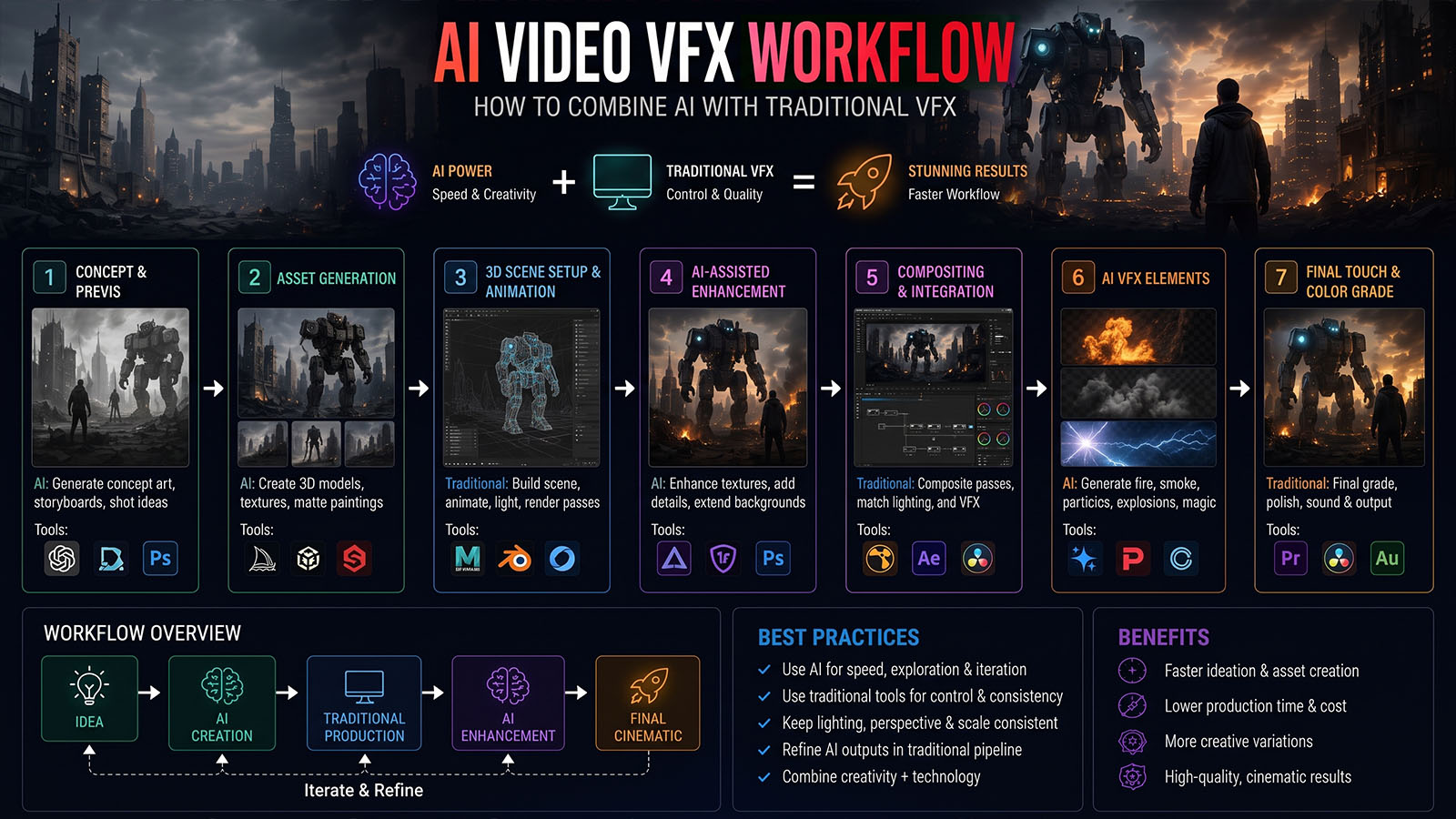


The most useful way to think about AI in VFX is not as a replacement for the pipeline. It is another tool inside the pipeline—one that can generate, transform or assist a shot while artists retain control through tracking, compositing, 3D, roto, paint and finishing.
The right way to think about AI + VFX
AI generation is powerful because it can create or modify visual information quickly. Traditional VFX is powerful because it gives artists repeatable control over geometry, motion, masks, layers, lighting and final integration.
Putting the two together creates a useful division of labor: AI can solve visual-content problems while the VFX pipeline solves control and integration problems.
That approach is becoming more visible in current industry workflows. A July 2026 SIGGRAPH discussion on AI VFX and generative video centered on “creative control,” while current production examples describe AI being refined inside compositing rather than simply accepted as final output.
Don’t ask, “Can AI make this shot?” Ask, “Which part of this shot can AI accelerate without taking away the control I need?”
The complete AI/VFX pipeline
1. Start with the plate
Before using AI, inspect the original footage. Identify camera movement, lens behavior, exposure changes, depth of field, motion blur, grain and anything that will affect the integration.
For professional work, keep the original plate untouched and work from controlled versions. This makes it possible to compare the AI result against the source at every stage.
2. Track the shot
Tracking provides the spatial information needed to place an AI-generated element into the scene.
| Tracking problem | Why it matters |
|---|---|
| Camera movement | Lets 3D or generated elements follow the original camera. |
| Object movement | Keeps an inserted element attached to a moving subject. |
| Plane/surface tracking | Useful for screens, signs, walls and product replacements. |
| Head/face tracking | Useful for controlled face and character effects. |
Traditional tracking remains valuable even when the generated content itself comes from AI. Current professional VFX training continues to emphasize tracking, stabilization and rotoscoping as core production skills.
3. Roto, key or isolate the subject
AI can assist masking and matting, but an artist still needs to inspect the edges. Hair, motion blur, transparent objects and fine details can reveal mistakes.
Silhouette’s 2026 release, for example, adds AI-assisted masking, matte creation and tracking tools aimed at reducing manual roto work.
The practical workflow is:
↓
ARTIST REVIEW
↓
EDGE REFINEMENT
↓
FINAL ALPHA
The same principle applies to any automated VFX step: use AI for the first pass, then make the final matte production-ready.
4. Generate or modify the element
Once the shot is understood, decide what AI should actually do.
| Goal | Possible AI role |
|---|---|
| Set extension | Generate or retexture the environment. |
| Crowd | Create additional background people or atmosphere. |
| Relighting | Generate a lighting transformation while preserving the plate. |
| Paint/cleanup | Remove or modify selected elements. |
| Concept effect | Explore an effect before building a controlled final version. |
| Background replacement | Generate a new environment around an isolated foreground. |
Current AI/VFX examples include turning an empty stadium into a crowd-filled shot while preserving the player and camera, and using AI relighting inside Nuke while maintaining a production compositing workflow.
5. Use depth, masks and references
Generated footage becomes easier to control when you provide spatial information. Depending on the workflow, this can include masks, depth maps, reference frames, tracked points or explicit trajectories.
Recent research is moving in exactly this direction. SIGGRAPH 2026 work such as Go-with-the-Track explores video compositing and motion control using point tracking, while newer generative compositing research focuses on trajectory control and explicit foreground/background representations.
The future of AI VFX is not only better generation. It is better control signals: masks, depth, tracking, trajectories, references and layers.
6. Relight and match the generated element
Even a visually impressive generated element can look pasted into the shot if its lighting does not match.
- Match key-light direction.
- Match color temperature.
- Match contrast and black levels.
- Match atmospheric perspective.
- Match depth of field and motion blur.
- Add contact shadows where required.
- Match grain and texture.
AI relighting workflows are already being demonstrated inside professional compositing environments, with emphasis on matching the result back to the original plate and restoring texture or correcting artifacts.
7. Composite and finish
Compositing is where the shot becomes believable. Build the image in logical layers so you can control foreground, generated element, atmosphere, background, reflections and color independently.
+ AI ELEMENT
+ FOREGROUND
+ ATMOSPHERE
+ SHADOW / REFLECTION
+ GRAIN
+ COLOR
= FINAL SHOT
Recent research on explicit video layers is also exploring ways to represent foreground and background separately for more controllable insertion and post-editing.
8. QC the final shot
AI artifacts can be subtle. Review the shot frame by frame, especially around faces, hands, object boundaries, reflections and fast motion.
| Check | Look for |
|---|---|
| Identity | Faces, bodies and recurring objects changing unexpectedly. |
| Geometry | Objects bending, merging or changing shape. |
| Motion | Unnatural acceleration, sliding or temporal flicker. |
| Lighting | Inconsistent shadows or highlights. |
| Edges | Halos, matte chatter and missing fine detail. |
| Integration | Wrong grain, sharpness, color or depth. |
Practical AI + VFX examples
Example 1: Expand a location
Plate → camera track → generate extension → match perspective → composite → grade.
This can be useful for turning a limited physical set into a larger environment while preserving the original foreground performance.
Example 2: Add a crowd
Plate → isolate foreground → generate crowd background → integrate → match lighting → composite.
A current 2026 AI VFX example demonstrates this exact concept with an empty stadium transformed into a crowd scene while retaining the original player and camera work.
Example 3: AI relighting
Original plate → AI relight → restore texture → integrate with original → final grade.
The key is that the AI output is not simply exported and forgotten; it is brought back into the compositing workflow for control and finishing.
Example 4: Generate a concept effect
Use AI to explore a creature, explosion, magical environment or transformation quickly. Once the visual direction is approved, use traditional 2D/3D methods where exact control is required.
When should you NOT use AI?
- When exact geometry is essential.
- When a client needs deterministic frame-by-frame revisions.
- When a hero asset must remain perfectly consistent across many shots.
- When the generated result is harder to clean than creating it traditionally.
- When licensing or confidentiality requirements prohibit the chosen service.
AI is valuable when it reduces production effort. If it creates more cleanup than the original task, it is the wrong tool for that shot.
The Zgian AI/VFX rule
That is the core philosophy we should use across Zgian’s AI/VFX content. It is technically more credible, more useful to professionals and more distinctive than presenting AI generation as a replacement for the entire VFX pipeline.
Frequently asked questions
Can AI replace traditional VFX?
Not across every production task. Current workflows show AI becoming useful for generation, relighting, masking, crowd creation and other areas, while tracking, compositing, cleanup and precise finishing remain important.
Can AI-generated video be composited into live action?
Yes. A practical workflow is to track the plate, isolate the foreground, generate or modify the required element, then integrate it through traditional compositing and finishing.
Why does AI VFX look fake?
Common causes include incorrect perspective, lighting, shadows, motion blur, grain, depth, edge quality and temporal consistency. Compositing is responsible for matching these factors.
What VFX skills are still important in an AI workflow?
Tracking, rotoscoping, compositing, color, lighting, 3D integration and visual judgment remain highly valuable. Current professional training and industry workflows continue to emphasize these fundamentals.
What is the future of AI VFX?
The direction is toward more controllable generation using tracking, depth, trajectories, layers and reference information—not simply bigger text prompts. Current 2026 research is already exploring these control mechanisms.
3D Generalist & VFX Professional · About the author →


