
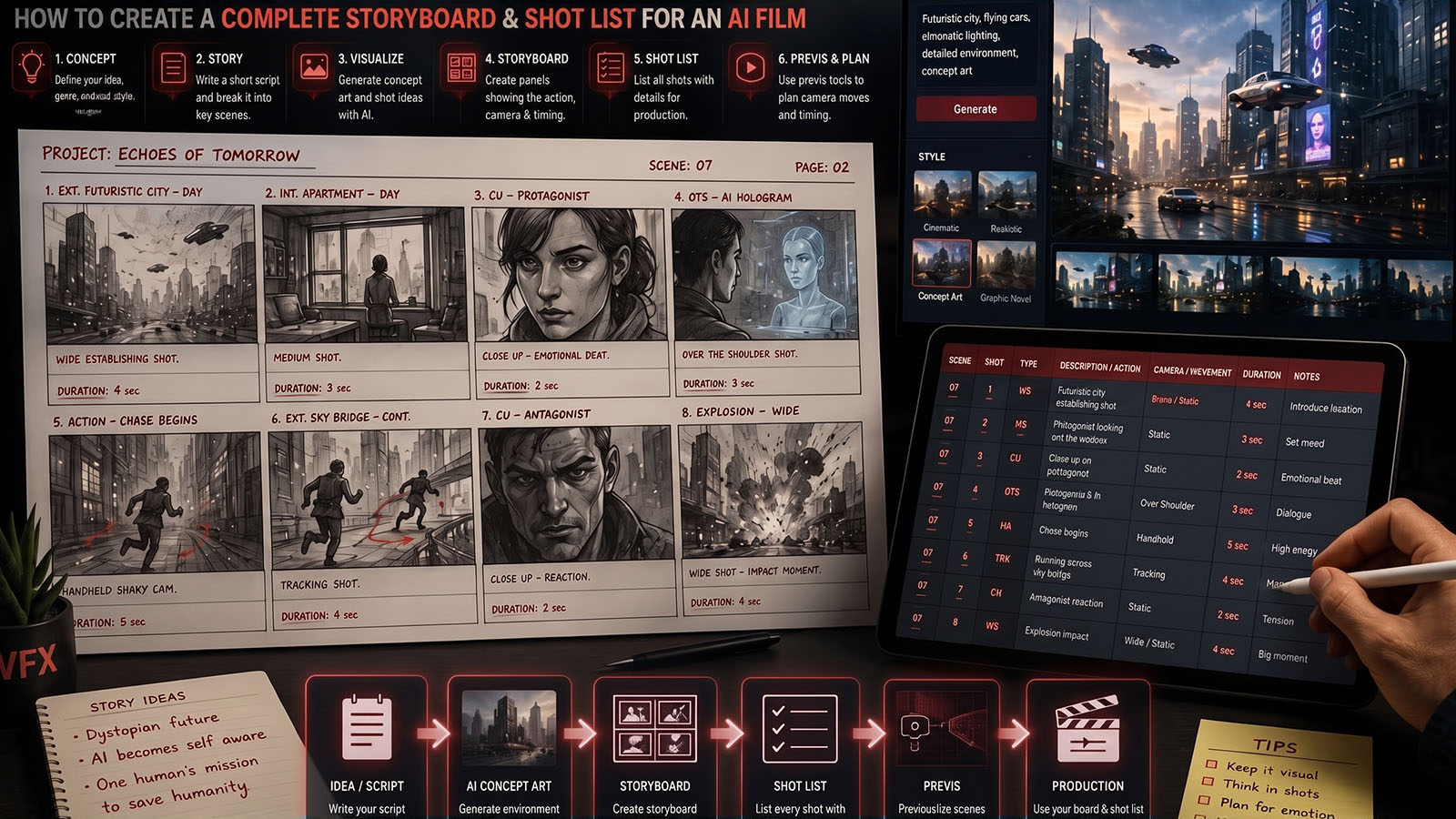


Turn a script into a visual plan before generating expensive video: scene breakdown, story beats, shot list, storyboard frames, camera direction, character continuity and AI-video prompts.
1. Storyboard vs shot list vs AI video prompt
These three documents are related, but they are not interchangeable.
| Document | Main question | Useful information |
|---|---|---|
| Storyboard | What should the audience see? | Visual composition, characters, environment, framing and major action. |
| Shot list | How will we cover the scene? | Shot number, size, angle, movement, subject action, continuity and technical notes. |
| AI video prompt | How should this generation behave? | Subject, action, camera, environment, lighting, style and motion. |
Current Runway guidance defines an AI shot list as a shot-by-shot production plan that translates narrative intent into framing, angle, movement, action and technical notes, then connects those entries to generation prompts.
2. Break the script into scenes
Start with the screenplay, not the image generator. Identify location, time, characters, objective, conflict and the beginning/end state of every scene.
| Scene field | Example |
|---|---|
| Scene | 03 — Rooftop |
| Time | Night |
| Characters | Maya, Daniel |
| Purpose | Maya discovers Daniel has lied. |
| Visual change | Calm conversation becomes confrontation. |
| Continuity | Same raincoat and damaged watch as Scene 02. |
3. Find the story beats before choosing shots
A storyboard becomes much stronger when every shot has a reason to exist. Identify the visual beats first: entrance, reveal, reaction, decision, escalation, reversal and exit.
→ STORY BEATS
→ COVERAGE NEEDS
→ SHOT LIST
→ STORYBOARD FRAMES
→ VIDEO GENERATION
This prevents a common AI-film problem: generating attractive shots that do not actually tell the story.
4. Build the AI-ready shot list
For each shot, record enough information that another person—or your future self—can understand the intended generation without guessing.
| # | Size | Angle | Camera | Action | Purpose |
|---|---|---|---|---|---|
| 01 | Wide | Eye-level | Locked | Maya enters rooftop | Establish geography |
| 02 | Medium | Eye-level | Slow track | Daniel turns | Connect characters |
| 03 | Close-up | Eye-level | Push-in | Maya notices watch | Reveal clue |
| 04 | CU | Slight low | Static | Daniel hides wrist | Confirm suspicion |
Runway’s August 2026 shot-list guide recommends treating the shot list as a bridge between script intent and generation prompts, including framing, angle, movement and action.
5. Create storyboard frames
The storyboard frame is a visual test of the shot. It does not need to look like the final film. Its job is to prove composition, screen direction, character placement, environment and visual continuity.
In 2026, AI storyboard tools increasingly generate structured sequences rather than isolated images, with some tools emphasizing character consistency, scene context and script-to-board workflows.
What each panel should answer
- Where is the camera?
- Who is visible?
- Where are they looking?
- What is the dominant action?
- What changes from the previous panel?
- Why is this shot in the edit?
6. Lock characters and locations
Use the character-consistency workflow we built in the previous Zgian article. Every recurring character should have a master reference, and every major location should have a visual reference.
+ WARDROBE
+ PROP
+ LOCATION MASTER
+ LIGHTING RULES
→ STORYBOARD CONTINUITY
This matters because a board is not merely planning images; it is a visual contract for the later generations. Current AI storyboard platforms increasingly emphasize character consistency across panels and reusable reference context.
7. Add camera direction
Once the composition works, add the camera language. Avoid writing “cinematic” as the only direction. Specify shot size, angle, movement, speed and what the movement reveals.
| Weak | Stronger |
|---|---|
| Cinematic camera | Medium close-up, eye-level, slow dolly push-in. |
| Dynamic shot | Wide tracking shot follows the runner at walking-to-running pace. |
| Beautiful reveal | Slow pan left reveals the second character behind the doorway. |
| Epic shot | 24mm wide shot, slow crane upward revealing the city. |
For a deeper treatment of AI camera movement, see Zgian’s AI Video Camera Control guide.
8. Convert a storyboard shot into an AI-video prompt
Do not copy every note from the production document into one giant prompt. Translate the approved shot into a clean generation instruction.
MEDIUM CLOSE-UP
EYE-LEVEL
SLOW DOLLY PUSH-IN
MAYA LOOKS AT DANIEL’S WATCH
RAINY ROOFTOP
35MM
COOL NIGHT LIGHT
TENSION BUILDS
AI-video prompt: “Medium close-up of Maya on a rainy rooftop at night, eye-level camera, slow controlled dolly push-in as she notices Daniel’s damaged watch, 35mm cinematic perspective, cool practical lighting, restrained tension, realistic rain and natural facial performance.”
The storyboard remains the source of truth; the prompt is the generation-ready translation.
9. AI storyboard tools and workflows in 2026
The category is evolving quickly, and the tools solve different problems. Current 2026 comparisons separate script-to-board systems, collaborative storyboard platforms, generative-image workflows and end-to-end pre-production systems.
| Workflow type | Best use | What to evaluate |
|---|---|---|
| Script-to-storyboard | Fast first-pass visual planning | Scene breakdown and character continuity. |
| Generative image + manual board | Maximum visual flexibility | Reference control and panel organization. |
| Collaborative storyboard platform | Teams and client review | Comments, versions and exports. |
| Storyboard-to-video platform | Fast AI previsualization | Shot control and handoff to generation. |
Do not choose a tool simply because it generates attractive images. Test a representative sequence with multiple characters, locations and camera angles before committing to a production workflow. Current 2026 tool comparisons specifically recommend testing consistency, complex multi-subject action and export/review workflows.
10. Complete Zgian AI filmmaking workflow
- Write the story. Define beginning, middle, end and scene objectives.
- Build the character bible. Lock identity and wardrobe.
- Build location references. Establish visual rules.
- Break the script into scenes.
- Find the story beats.
- Create the shot list.
- Generate storyboard frames.
- Approve the board. Fix story and composition problems now.
- Convert approved shots to AI-video prompts.
- Generate short clips. Test before full production.
- Review continuity. Character, camera, lighting and geography.
- Edit the sequence. Build the story before polishing every shot.
- VFX and finishing. Composite, grade, sound and master.
11. Common AI storyboarding mistakes
| Mistake | Problem | Fix |
|---|---|---|
| Generating video before planning shots | Many attractive but unusable clips. | Storyboard first. |
| One image per scene | No coverage or edit plan. | Break scenes into shots. |
| No shot purpose | Repetitive visual sequence. | Give every shot a narrative job. |
| Changing character references | Identity drift. | Use approved masters. |
| Ignoring screen direction | Spatial confusion. | Track eyelines and movement direction. |
| Over-detailing early | Wasted effort when story changes. | Block composition first. |
| Choosing tools by image quality alone | Poor production handoff. | Test exports, consistency and workflow. |
12. Storyboard QC checklist
- Does every scene have a clear objective?
- Does every shot have a purpose?
- Can the geography be understood?
- Are screen directions consistent?
- Are characters recognizable across panels?
- Are costumes and props continuous?
- Do shot sizes provide useful coverage?
- Are camera movements motivated?
- Does each panel lead naturally into the next?
- Can every approved panel be translated into a generation prompt?
How this fits the Zgian AI Video cluster
CAMERA → AI Video Camera Control
STORYBOARD → this guide
AI FILMMAKING → AI Filmmaking Hub
CINEMATIC AI → Cinematic AI Hub
RESTORATION → AI Video Restoration
UPSCALING → AI Video Upscaling
Frequently asked questions
What is an AI storyboard?
An AI storyboard is a sequence of planned visual panels generated or assisted by AI, usually connected to scenes, shots, characters, camera direction and story beats. It is a pre-production tool, not the final film.
Can AI create a storyboard from a script?
Yes. Current tools can help break scripts into scenes and shots and generate visual frames, although the director still needs to approve composition, continuity and storytelling decisions.
What is the difference between an AI storyboard and an AI shot list?
The storyboard shows the visual composition of the planned shots. The shot list structures those shots with production information such as framing, angle, movement and action.
Should I storyboard every AI video shot?
For a narrative film, storyboard at least the important beats, transitions, complex action and continuity-sensitive shots. Simpler inserts may need only a shot-list entry.
What makes an AI storyboard useful for filmmaking?
It should reduce ambiguity before expensive generation: clear shot purpose, composition, camera direction, character continuity and a direct path into generation prompts.
Continue the Zgian AI Filmmaking series
3D Generalist & VFX Professional · About the author →


