
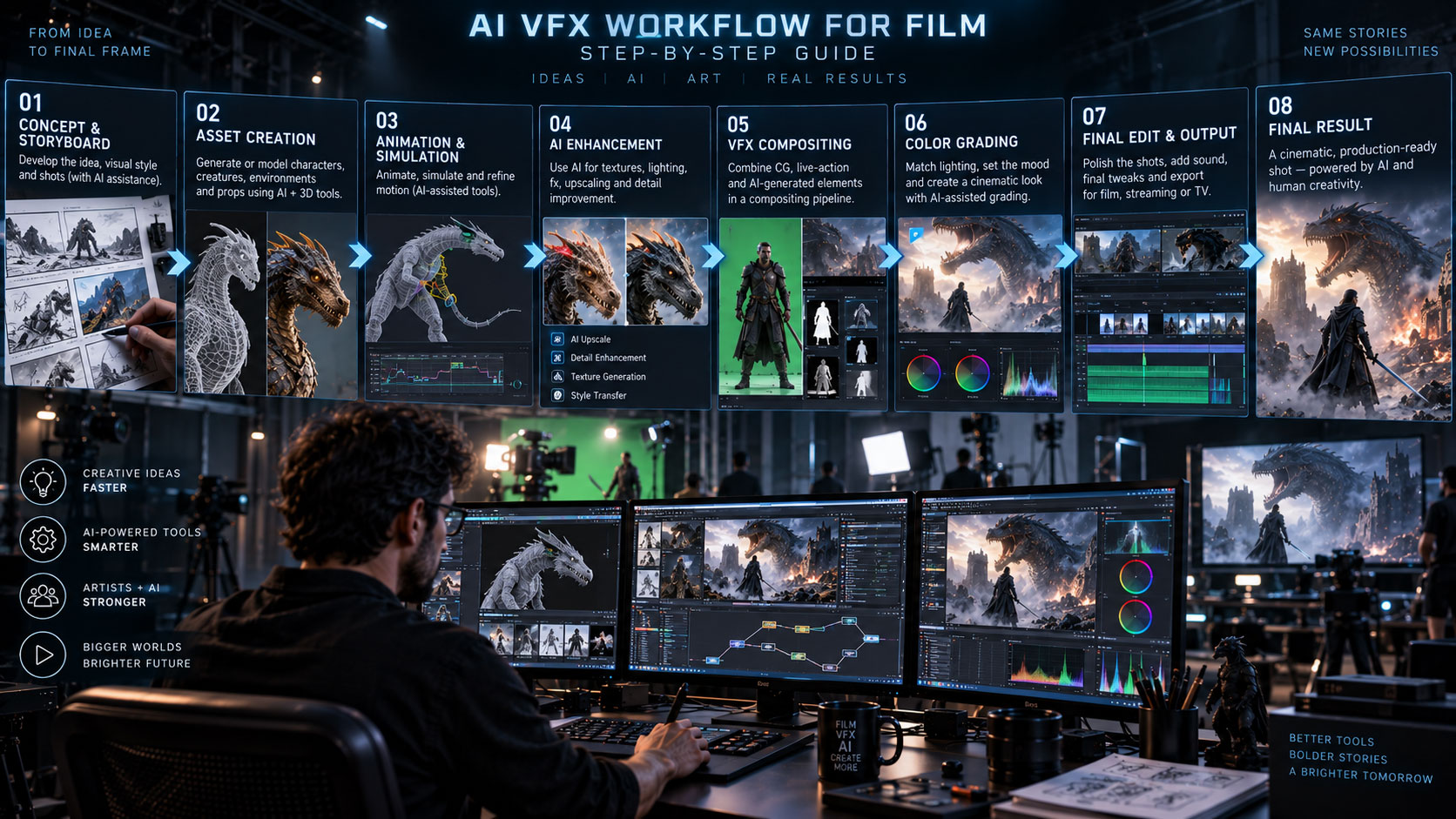

A practical hybrid pipeline for using AI to accelerate rotoscoping, tracking, cleanup, 3D, animation and compositing—without losing the control that professional VFX requires.
The complete AI VFX pipeline
Step 1 — Prepare the plate
Start with the highest-quality source available. Before using AI, check frame rate, resolution, color management, shutter/motion blur and whether the footage has already been compressed or graded.
| Check | Why |
|---|---|
| Frame rate | Prevents timing and tracking inconsistencies. |
| Resolution | Preserves detail for roto, tracking and cleanup. |
| Lens metadata | Helps camera solving and CG integration. |
| Color space | Prevents mismatched exposure and saturation. |
Step 2 — Plan the VFX shot
Break the shot into elements before generating anything. Identify what is real, what is CG, what must be removed and what must interact with the camera or actor.
+ ROTO / MATTE
+ TRACKED CAMERA
+ CG ELEMENTS
+ SHADOW / ATMOSPHERE
+ GRADE
= FINAL SHOT
This planning stage is where experienced VFX artists gain an advantage: they can predict which parts of the image need reliable geometry and which can be solved with a faster 2D technique.
Step 3 — Rotoscope and isolate
Rotoscoping creates a matte that separates a foreground element from its background. AI can dramatically speed up the first pass. In After Effects 26.2, Object Matte uses AI-powered subject selection, propagation and edge refinement. Adobe’s July 2026 tutorial documents selecting a subject, applying the matte across frames and refining difficult edges.
Where AI roto works well
- Clearly separated people or objects
- Moderate camera movement
- Shots with recognizable subjects
- Long clips where manual propagation would be repetitive
Where manual cleanup remains important
- Hair and fine detail
- Motion blur
- Transparent or reflective objects
- Heavy occlusion
- Smoke, glass and complex edges
Adobe’s own workflow still emphasizes manual refinement tools such as Refine Edge and frame-by-frame correction when necessary.
Step 4 — Track the camera
Next, solve the camera or object movement so CG elements can remain locked to the footage. AI-assisted systems can accelerate feature analysis and camera estimation, but the result must be validated.
Autodesk Flow Studio currently includes automatic camera tracking and editable tracking exports as part of its AI VFX workflow.
For a deeper explanation, see our AI camera tracking guide.
Step 5 — Build CG elements
Use AI when it saves time, but convert important generated elements into controllable production assets when the shot needs repeatability.
| Shot need | Recommended approach |
|---|---|
| Background concept | AI image/video generation can be useful for exploration. |
| Hero creature | AI base + artist-controlled 3D asset. |
| Simple prop | AI 3D generation may be enough after cleanup. |
| Camera-critical environment | Reliable 3D geometry and scale. |
Flow Studio can export editable VFX elements and scene data for Maya, Blender, Unreal Engine and 3ds Max, making it more suitable for a hybrid pipeline than an isolated generated clip.
Step 6 — Animate and light
Animation must match the plate’s physical logic. If a CG character walks on a real floor, feet, contact shadows and body weight need to agree with the environment.
AI motion capture can provide a fast starting point, while traditional keyframe cleanup restores acting, timing and contact accuracy. This is the same principle used in our AI character animation workflow.
Lighting checklist
- Direction of key light
- Color temperature
- Shadow softness
- Ambient fill
- Reflections
- Contact shadows
- Atmospheric depth
Step 7 — Composite
Bring the elements together in a layered, editable composite. AI can help with object removal, mattes, cleanup and image manipulation, but final integration depends on consistent layers and artist judgement.
+ MIDGROUND
+ ACTOR / CG
+ SHADOWS
+ ATMOSPHERE
+ DEPTH
+ GRAIN
→ FINAL COMPOSITE
Adobe’s current After Effects tools combine AI isolation with traditional refinement, while Fusion provides a node-based environment with 2D/3D compositing, camera tracking, rotoscoping and keying tools.
Step 8 — Quality control and delivery
Never judge a VFX shot from one frame. Scrub the entire sequence and check temporal consistency.
- Check matte edges frame by frame where necessary.
- Check CG sliding against the plate.
- Check shadows and contact points.
- Check motion blur.
- Check grain and compression.
- Check color and exposure.
- Check object identity across frames.
- Render a review version before final delivery.
Why hybrid beats AI-only for serious VFX
AI is excellent at generating plausible results and accelerating repetitive operations. Professional VFX also requires the ability to change one specific property without destroying everything else.
| AI contribution | Traditional contribution |
|---|---|
| Fast segmentation | Precise matte correction |
| Fast camera analysis | Solver control and validation |
| Rapid asset generation | Topology, UVs, rigging and art direction |
| Motion capture | Animation polish |
| Generative cleanup | Layered final composite |
Use AI for the first 80%; use your VFX skills to make the final 20% believable. The exact percentage varies by shot, but the principle is useful: automation creates speed; artists create consistency.
Example: adding a CG creature to a live-action shot
- Import the clean plate.
- Analyze the camera movement.
- Create a tracked 3D camera.
- Rotoscope the actor or foreground objects.
- Generate or model the creature.
- Rig and animate the creature.
- Match the real lighting.
- Create contact and cast shadows.
- Render separate passes.
- Composite the creature behind/in front of the correct elements.
- Add atmospheric effects, grain and final color.
This is where the difference between an impressive AI clip and a believable VFX shot becomes obvious: the creature must obey the camera, lighting, depth and physical relationships of the plate.
How this connects to the Zgian VFX ecosystem
AI MOCAP → Character Animation Workflow
AI CAMERA → Camera Tracking Guide
AI VP → Virtual Production Workflow
TRADITIONAL VFX → VFX Hub
Frequently asked questions
What is an AI VFX workflow?
It is a VFX pipeline where AI assists tasks such as roto, tracking, cleanup, asset generation or motion capture while traditional tools and artists control the final shot.
Can AI do the entire VFX shot?
For simple shots it may handle a large portion of the work, but complex film shots usually benefit from editable 3D, tracked cameras, layered compositing and human quality control.
What is the best AI tool for VFX?
There is no single best tool for every task. Current workflows increasingly combine specialized tools for roto, tracking, 3D, animation and compositing. Flow Studio is one current example of a broader AI VFX platform, while After Effects provides AI-assisted roto alongside traditional compositing tools.
Does AI replace compositing?
No. AI can accelerate mattes, cleanup and image manipulation, but compositing remains responsible for integrating layers, light, depth, atmosphere and continuity.
Continue the Zgian AI + VFX series
3D Generalist & VFX Professional · About the author →


